SEO Site Migration in Sydney, Australia: Your 2026 Guide to Protecting Rankings, Driving Revenue Growth, and Boosting Organic Search Visibility

Hey webiste owner, if you're running a business in Sydney—or anywhere in Australia really—and you're staring down a website migration, you know it's not just a tech project. It's one of those moments where things can go really right or really wrong for your online presence. I've seen it happen too many times: a company rebrands, switches platforms, or redesigns their site, and suddenly organic traffic tanks by 30-50%. Revenue follows suit, and everyone's scrambling.
But it doesn't have to be that way. Done properly, a well-planned SEO site migration can actually become a massive opportunity to fix old issues, improve user experience, and push your search rankings higher in the long run. Especially here in Sydney's competitive market, where local searches for services, e-commerce, and professional firms are brutal.
In 2026, with Google's AI Overviews rolling out more aggressively, stricter Core Web Vitals enforcement, and everyone chasing better organic search optimization, getting this right matters more than ever. Whether you're moving domains, shifting from an old CMS to something like Shopify or WordPress, restructuring URLs, or just doing a big redesign, this guide walks you through it step by step. I'll focus on the stuff that actually moves the needle for revenue growth, ROI of SEO, and long-term visibility.
Why Website Migration Feels So Risky (Especially in Sydney)
Sydney businesses face unique pressures. You've got fierce local competition—think real estate agents, tradies, law firms, restaurants, and online retailers all fighting for the same Google real estate. A migration gone wrong doesn't just hurt nationally; it can wipe out your "near me" and suburb-specific rankings overnight.
Common pitfalls I've watched unfold:
Broken 301 redirects that leak link equity
Staging sites accidentally indexed (hello, duplicate content penalties)
Slow page loads post-migration tanking mobile rankings
Missing or messed-up structured data for local SEO
Forgetting to update Google Business Profile links or schema for Australian locations
The good news? Agencies right here in Sydney (Rocket Agency in Surry Hills, Bring Digital, Search Insights, StudioHawk, and others) handle these migrations regularly and know the local nuances. But even if you're DIY-ing it or working with your dev team, following a solid plan keeps the damage minimal—or turns it into growth.
The Real Payoff: Revenue Growth and ROI of SEO
People sometimes see SEO as a "nice to have," but during a migration, it's directly tied to your bottom line. Organic traffic often converts at 3-5x the rate of paid channels. Lose it, and you might need to pump more into PPC campaigns just to stay afloat—hello, skyrocketing costs.
A clean migration preserves (or boosts) your organic search visibility, which delivers compounding ROI of SEO over months and years. I've worked with clients who, after a proper migration:
Recovered 95%+ of pre-migration traffic within 90 days
Saw revenue jumps of 20-40% from better on-page optimization and faster site speed
Reduced reliance on paid ads because organic channels started pulling more weight
Pair that with tools like Google Analytics 4 (GA4) for proper tracking—set up events, enhanced e-commerce if you're selling, and those migration comparison views—and you can actually measure the ROI of SEO in dollar terms.
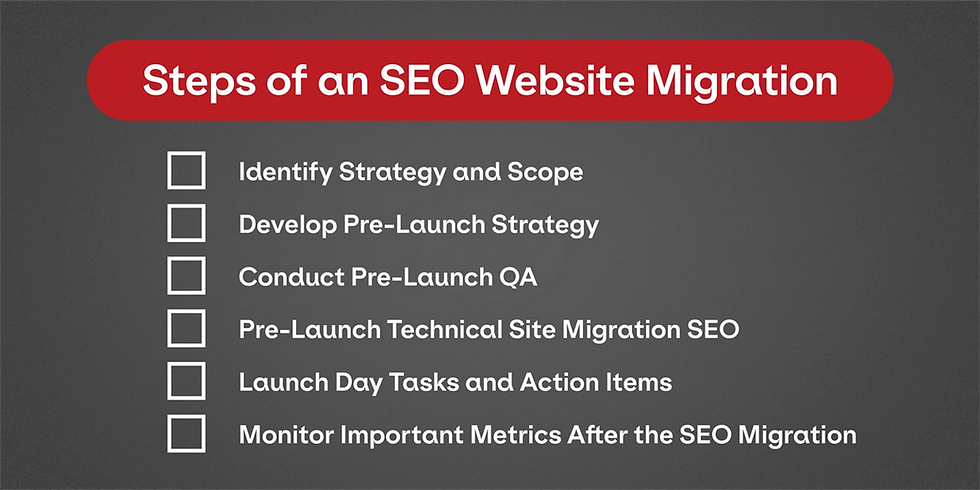
Step-by-Step SEO Migration Checklist Tailored for 2026 (Sydney Edition)
Let's break it down into phases so you can actually action this.
Phase 1: Planning & Audit (Do This First!)
Start 3-6 months out if possible. Rush jobs are where most disasters happen.
Audit your current site — Use Screaming Frog or Ahrefs to crawl everything. Note high-traffic pages, top keywords (especially Sydney-specific ones like "plumber Surry Hills" or "best SEO agency Sydney"), backlinks, and issues like slow images or thin content.
Set clear goals — "Maintain 90% organic traffic in 3 months," "Improve page speed score by 20 points," "Boost conversions from organic by 15%." Tie it to revenue.
Map every URL — Old to new. This is your bible. Include 301 redirects for everything—don't do 302s or meta refreshes.
Backup obsessively — Site files, database, GA4 data exports, Search Console screenshots.
Phase 2: Pre-Launch Work (Staging Site Heaven)
Build the new site in staging. Block bots with robots.txt or .htaccess.
Transfer all SEO assets — Titles, meta descriptions, H1s, canonicals, alt text, schema markup (especially LocalBusiness for Sydney addresses).
Optimize website images for search — This is huge in 2026. Compress them (aim <100KB), use descriptive filenames (e.g., sydney-roof-repair-before-after.jpg), add meaningful alt text with keywords naturally, implement lazy loading, and use WebP format. Google loves fast-loading images, and it helps image search traffic too.
Technical fixes — HTTPS everywhere, mobile-first design, Core Web Vitals passing (LCP <2.5s, FID/INP low, CLS <0.1). Fix JavaScript rendering if your new platform is heavy on it.
QA like crazy — Crawl staging, check for duplicates/orphans, test on mobile/desktop, validate structured data.
Phase 3: Launch Day
Do it off-peak—maybe Sunday morning Sydney time when traffic's lowest.
Flip the switch — Implement redirects server-side immediately. No chains longer than 3-5 hops.
Update everywhere — Submit new XML sitemap in Google Search Console, verify domain if changing, update GA4 property if needed, fix robots.txt.
Monitor live — Watch Search Console for crawl errors, GA4 for traffic dips, server logs for 404s.
Phase 4: Post-Launch (The Long Game – 3-9 Months)
This is where recovery (or growth) happens.
Track everything in GA4 — Compare pre/post periods, watch organic sessions, conversions, revenue attribution.
Fix fast — Redirect 404s as they pop up, monitor ranking fluctuations (normal in first weeks), disavow toxic links if needed.
Optimize further — Use migration data to refine content, build local backlinks (Sydney business directories, guest posts), and keep improving speed/images.
Supplement with PPC if needed — Run targeted PPC campaigns in Sydney suburbs to bridge any short-term gaps while organic recovers.
Mistakes I See Sydney Businesses Make (Avoid These!)
Launching without full redirect mapping
Ignoring optimize website images for search—huge speed killer
Not involving SEO early (devs focus on function, not search)
Forgetting local SEO signals (NAP consistency, schema)
Panicking at normal early dips and making knee-jerk changes
Tools That Actually Help
Google Search Console & GA4 (free, essential)
Screaming Frog or Sitebulb for crawls
Ahrefs/Semrush for keyword/backlink tracking
Image optimizers like TinyPNG or Squoosh
Redirect checkers
Wrapping It Up
A website migration doesn't have to spell disaster for your search rankings or revenue growth. In Sydney's fast-moving digital scene, treating it as an SEO project from day one protects what you've built and sets you up for better organic search visibility and stronger ROI of SEO.
If you're in the thick of planning one, take a breath, map it out properly, and maybe chat with a local expert if it feels overwhelming. The businesses that get this right don't just survive the migration—they come out ranking higher and converting more.
Got questions about your specific setup? Contact us now. Happy to assist you.


Comments